
Your website should integrate with your business systems

A website form submission often creates more manual work than expected. Someone fills out a “Contact us” or “Contact Sales” form, and then someone from your team forwards the message internally, copies the details into a CRM, sends a notification in Slack or Teams, or updates a spreadsheet. For smaller websites, this may be manageable for a while, but as submissions increase, the process becomes repetitive and inconsistent quickly.
This is usually where CMS integration limitations start showing up. Can the website easily send data to external systems? Can workflows be automated without custom development? Can external tools interact with the CMS reliably? These are practical questions for teams evaluating a CMS, especially if they already use tools like Zapier, Make, or n8n.
Orchard Core, an open-source CMS and modular application framework built on ASP.NET Core, already supports these kinds of workflows out of the box through its built-in Workflows and HTTP features. That means you can send form submission data to external systems, receive webhook calls from automation platforms, and trigger internal workflows without building a custom Orchard Core module for common scenarios.
Sending form submissions to external systems
In this example, a visitor submits a contact form on an Orchard Core website. An Orchard Core workflow automatically sends the submitted form data to an external webhook endpoint. From there, the automation platform handles the next steps, such as sending a notification, updating a CRM, or triggering another workflow.
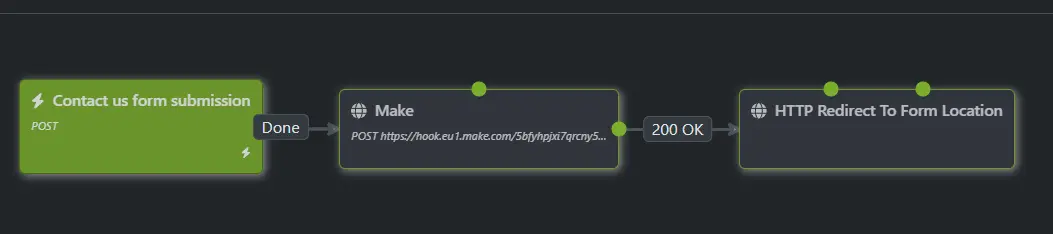
This workflow is built using Orchard Core’s workflow editor and HTTP activities. No custom module development is required. The same pattern works with Zapier, Make, n8n, or any other system capable of receiving webhook requests.
Follow these steps to reproduce the connection, then customize it as needed:
- Create a form using the built-in Forms module.
- Create a workflow using the built-in Workflows module.
- Connect them so that submitting the form triggers the workflow. Refer to this video for detailed instructions.
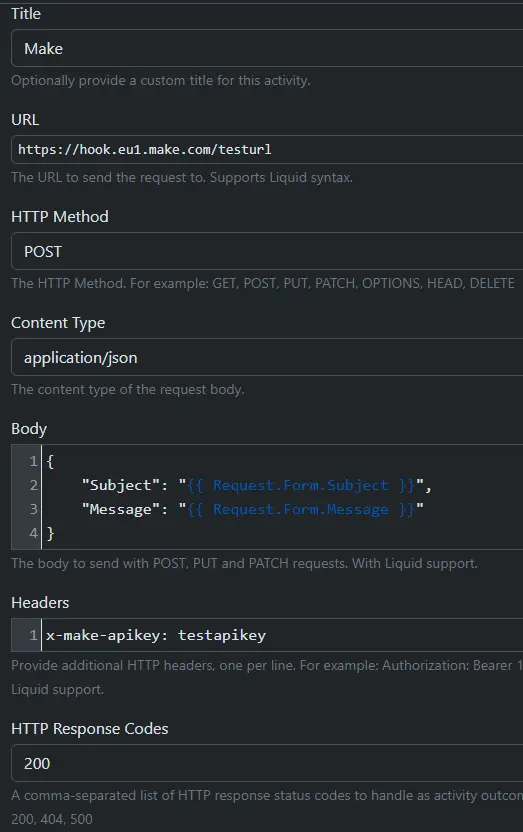
- Enable the Workflows HTTP module to send the form data to Zapier, Make, n8n, or any other system that can receive webhook requests.
- Configure an HTTP Request action with the webhook URL, and populate the request body with the data you want to send, as shown in the screenshot.
- Continue building the rest of your workflow or finish it.
- Configure the receiving system as you normally would.
The automation platform acts as the connection point between the website and the other systems. In the example below, Make receives the webhook from Orchard Core, sends an email notification, and then sends data back to Orchard Core through another webhook call. This is a very small example, of course, you can manage your complex workflows as you usually do.
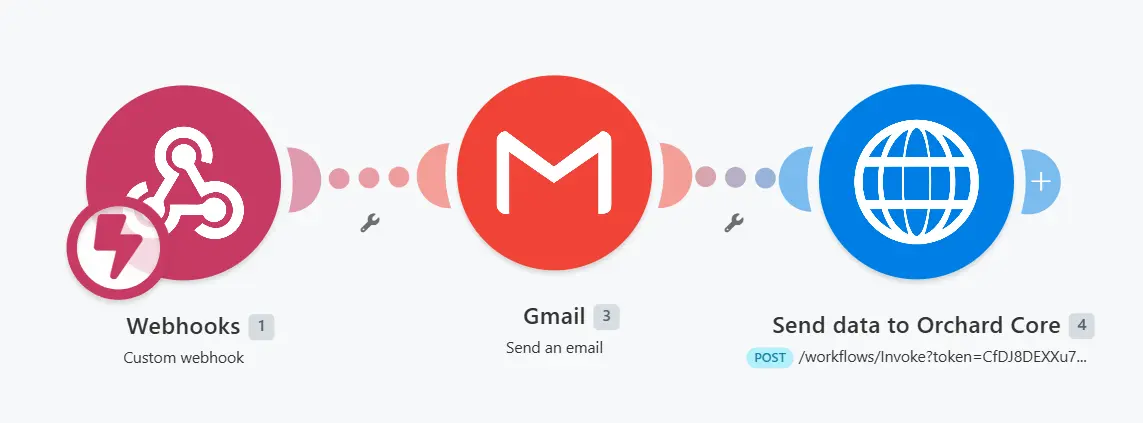
This setup keeps the website implementation relatively simple while making the integration workflow easier to change later. For example, you can modify the automation flow to create or update CRM contacts, notify Slack or Teams channels, update Google Sheets or Airtable, create support tickets, or trigger email workflows without rebuilding the Orchard Core implementation itself.
That separation is often useful in real projects. The website structure may stay mostly the same, while the business workflow around it changes more frequently. A team may switch CRMs, add a new notification channel, change lead routing rules, or introduce a new reporting step. With webhook-based automation, those changes can often be handled in the automation layer instead of turning every adjustment into a CMS development task.
Receiving webhook calls in Orchard Core
The workflow does not need to be one-way. Orchard Core can also receive webhook calls from external systems and trigger internal workflows automatically. In the example below, an external webhook call creates a content item inside Orchard Core.
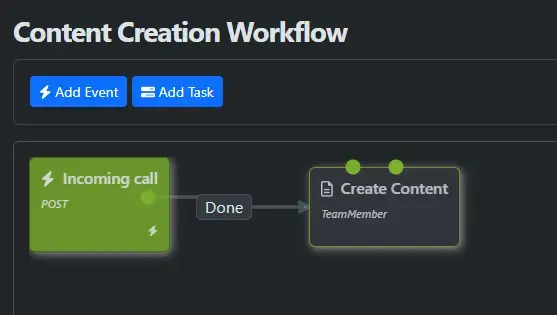
Creating a workflow like this is even easier:
- Create a new workflow.
- Add an HTTP Request event.
- Use the URL provided by Orchard Core in your external system for sending data.
- Add any follow-up workflow actions in the Orchard Core workflow, such as creating or updating content, and so on.
This can be useful when external systems need to create or update content, trigger publishing workflows, or synchronize operational data with the website. For example, an external automation tool could send approved content data back into Orchard Core, update a status page, or create an internal content item based on a completed business process.
Again, this is handled using built-in Orchard Core functionality rather than custom development. That is the main point: Orchard Core is not only capable of publishing and managing content, but it can also participate in workflow automation through features that are already part of the platform.
Why this matters during CMS selection
Many CMS platforms handle content editing well, but integration flexibility becomes important quickly once the website needs to interact with other systems. If your team already uses CRM, project management, email marketing, analytics, or internal operational tools, the CMS needs to fit into that environment cleanly.
This is where built-in webhook and workflow support matters. For common scenarios, such as sending form submissions to an automation tool or receiving data back from another system, Orchard Core can handle the integration without a custom module. That gives you a practical starting point before deciding whether a larger custom integration is needed.
There are still trade-offs. Using Zapier, Make, or similar platforms introduces external dependencies, which may or may not be acceptable depending on the workflow. No-code workflows can also become difficult to maintain if they grow without proper ownership or documentation. For highly specialized, sensitive, or very large-scale integrations, custom development may still be the better option. Orchard Core is still a good fit in those cases too, because its modular architecture makes it straightforward to extend the platform.
Running this on DotNest
Because these examples rely on built-in Orchard Core features, the same workflows can also be implemented on DotNest, our managed Orchard Core SaaS hosting platform, without custom modules or infrastructure setup. That makes it easy to experiment with webhook-based integrations and workflow automation while still using a production-ready Orchard Core environment.
This is useful if you want to test how Orchard Core fits into your existing systems before committing to a larger implementation. You can start with a simple form submission workflow, connect it to Zapier, Make, or n8n, and validate whether the pattern works for your team. If you’d like guidance on setting up a similar workflow or deciding where built-in automation ends and custom integration should begin, get in touch with us.